Application matrix
Notepad, Teams, Outlook, Word, Slack, Chrome, Edge, Gmail, VS Code, and OneNote must meet their capture and replacement targets.
A native tray companion that captures only the text you explicitly select, shows a local word-level diff, and replaces it only after you accept — with your own API key.
Safety before shipping
A green build is only the beginning. The Windows release is qualified against real applications, display configurations, and installer lifecycle behavior.
Notepad, Teams, Outlook, Word, Slack, Chrome, Edge, Gmail, VS Code, and OneNote must meet their capture and replacement targets.
Popup placement must pass from 100% to 200% scaling on single and mixed-DPI multi-monitor setups.
Install, automatic update, repair, rollback, Defender, SmartScreen, and uninstall must all be recorded cleanly.
The Windows companion mirrors the Mac workflow, with native Win32 integrations where they matter.
Runs from the system tray with rewrite, pause, settings, and exit actions — no Dock-style distraction.
Prefers UI Automation TextPattern. Falls back to a guarded clipboard transaction with sequence checks for Teams, Slack, and similar apps.
Streams tokens from your provider, computes a local word-level diff, then accepts in place or copies instead.
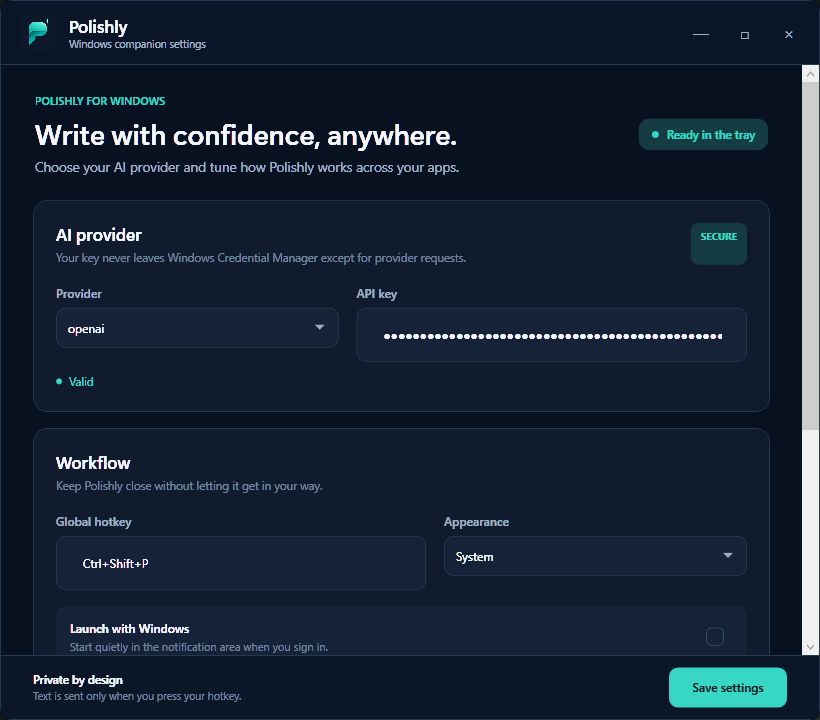
Choose OpenAI, Anthropic, Groq, Cerebras, or Demo mode. Keys stay in Windows Credential Manager.
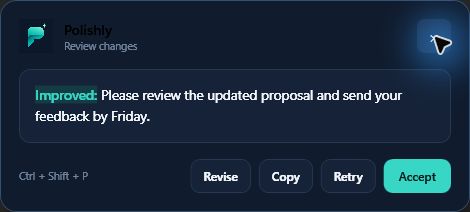
Non-activating popup placement near the selection so focus stays in the app you’re editing.
Polishly for Windows is designed around a zero-trust paste guarantee: never paste unless it can prove it is returning to the exact source application and field.
 Polishly tray app
Local key + local diff
Polishly tray app
Local key + local diff
Tell us which applications and monitor setup you use. Beta access is shared when the build is ready for that configuration. Developers can also browse the open source windows/ tree.
Native .NET / WPF tray app with UI Automation capture, guarded clipboard paste, Credential Manager storage, and Ctrl + Shift + P.
dotnet build windows/Polishly.Windows.sln--demo-rewrite for a headless check.Need a free provider key? Follow the Groq setup guide.
Signed and notarized menu-bar app for macOS 14+. Same review-first rewrite model.
macOS 14+ · free · MIT licensedNot yet. The app is completing compatibility, multi-monitor, signing, and installer qualification. The download will be enabled only after those safety gates pass. Join the private beta if you want early access.
Ctrl + Shift + P. Select text first, then press the shortcut to capture, rewrite, and review.
Apps with accessible text fields. Notepad and similar apps prefer UI Automation. Electron apps such as Teams and Slack typically use the guarded clipboard path. Qualification covers Notepad, Teams, Outlook, Word, Slack, Chrome, Edge, Gmail, VS Code, and OneNote.
In Windows Credential Manager on your machine. Polishly has no rewrite backend and does not receive your keys.
Tell us which applications and monitor setup you use. Beta access is shared only when the build is ready for that configuration.